Overview
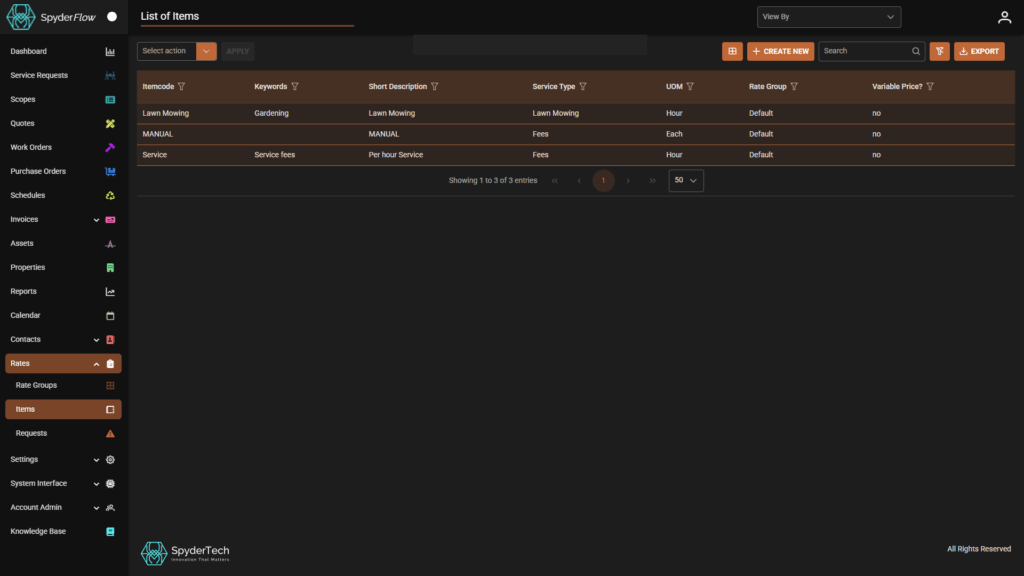
List of Items (like other ‘List of’ pages) gives access to:
- View – See the items in list or Select for more detailed view.
- Select Action – Bulk action Delete Items from List view
- Select List Columns – Customise which columns are in the List View
- +Create New – Create a new Item
- Search – Search for an item in the list (helpful if the list is over multiple pages)
- Filter by column headings – Filter by what you find most useful
- Clear Filters – Clear back to the default view
- Export List – Export to Spreadsheet and more columns may be available in the listed view
Edit Listed items
- Select individual Item and Click Edit
- Modify field information through dropdowns, tick boxes, typing additional information or Selecting who can view the item eg If you want External Users to see Item this will need to be added (Can be Created by External Users or Can be Changed by External Users)
- Note! that if a field cannot be edited then it cannot be changed. If need to change an un-editable field you may instead need to create a new field.
- Save to complete
Note the example below are Items in 1 x Default Rate Group. Your organisation can work with one rate group or many depending on size and availability of items and requests you would like your users to access.