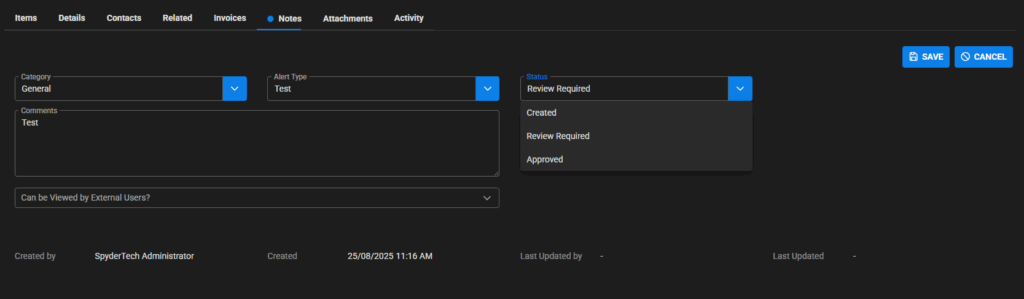
Purchase Order Notes Tab
Located: Main Menu –> Purchase Orders –> List of Purchase Orders –> Select Purchase Order –> Notes Tab
This can be general notes, specific notifications to contractors, to and from information sharing in regards to the purchase order to flow also to the work order.
This area can be accessed by the tab area and click across to Notes tab.
To add a Note to Purchase Order
Click +ADD (right side of screen)

Fill in fields:
- Category
- Alert Type
- Status
- Comments
- Can be viewed by External Users? (Client/Contractor)
Status can be:
- Created
- Review required
- Approved
Click Save when complete
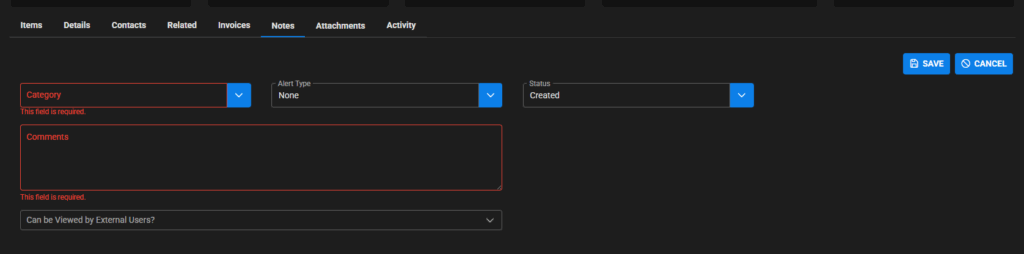
Example Category types
Note! These category types are set up in your organisation SpyderFlow subscription and are your categories. Listed below are only example types.
- Access issues
- Claim request
- Follow up
- Contact details
- Contractor notifications
- General
- Photo
- Travel
- Additional Order information
Example Alert Types
Set also by your organisation using your types of alerts. Not limited to the listed below.
- None
- Alert
- OHS
Status meanings
- Created is when the note is added.
- If a note is in ‘Review Required’ status a ‘Dot” will appear next to Notes heading.
- Approved is when the note has been reviewed and changed to approved.
- Could be used by internal staff to check and approve external user notes on an order.