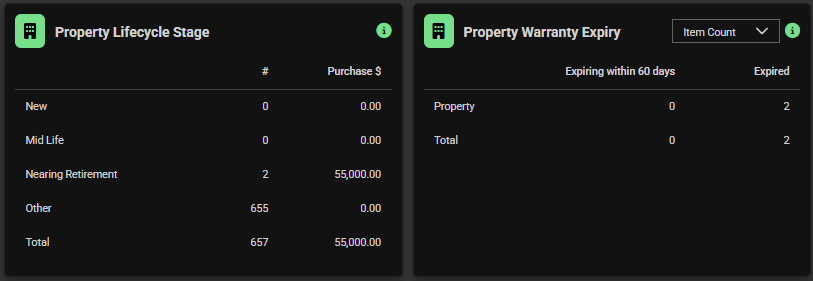
New Dashboard Widgets (Asset & Property):
-
- Warranty Expiry
- Lifecycle Stage
These widgets are generic and pre-configured, available to all subscribers using the Asset or Property modules. They surface live insights into health, risk, and lifecycle performance, while supporting compliance and operational planning.
Asset & Property Lifestyle Stage
Choose from dropdown options
- Default shown in example below: All
Note: Only assets with both an acquisition date and end of life date are included. Purchase price is shown where available and may not reflect all assets
View and select into Assets by # or Purchase $:
- New
- Mid Life
- Nearing Retirement
- Other
- Total

Asset & Property Warranty Expiry
Choose from dropdown options
- Default shown in example: Item Count.
- Others could include: Purchase Price, Missing Expiry
Note: Only assets with both an acquisition date and end of life date are included. Purchase price is shown where available and may not reflect all assets
View and select into Assets by values in:
- Expiring within 60 days
- Expired