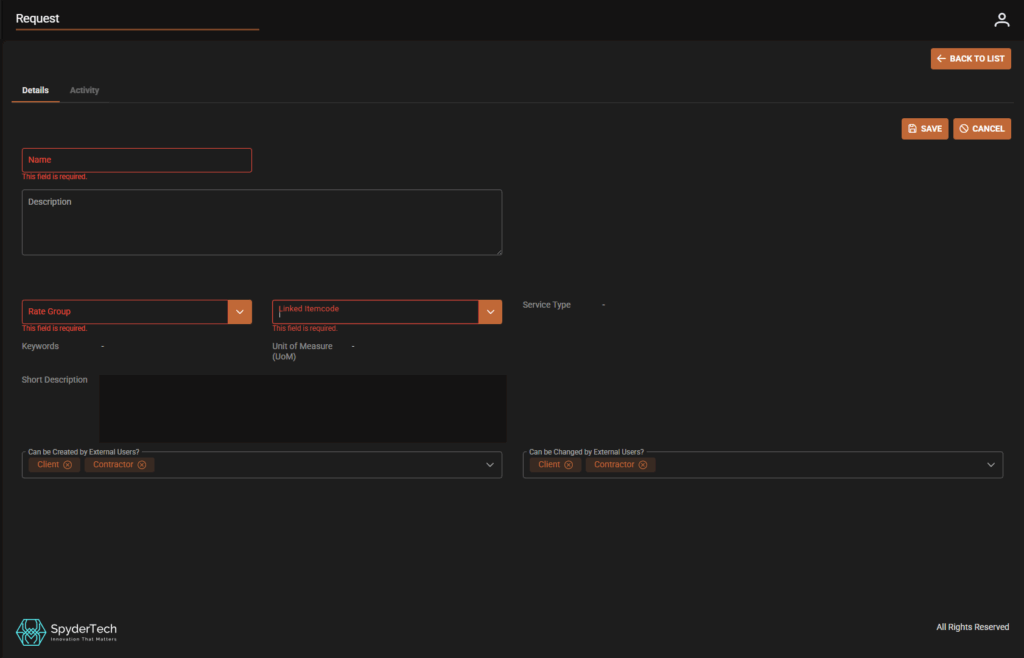
Requests can be created inside Rate Groups linked to Items see related – Rates | Rate Groups | New Items and Linked Requests
OR
Requests can be Created and then linked to Rate Group and Itemcode – See below
To Create a New Request
Go to: Main Menu –> Rates –> Requests –List of Requests –> +Create New
Fill in Mandatory fields:
- Name
- Rate Group
- Linked Itemcode
Service type, Unit of Measure, keywords, Short Description will prefill from rate Group and Itemcode selected
- Add information to Description fields (Optional)
- Can be Created by External Users? Select if required e.g. Client, Contractor
- Can be Changed by External Users? Select if required e.g. Client, Contractor
Click Save
Check Activity, Click Back to List to Create More Requests if required.