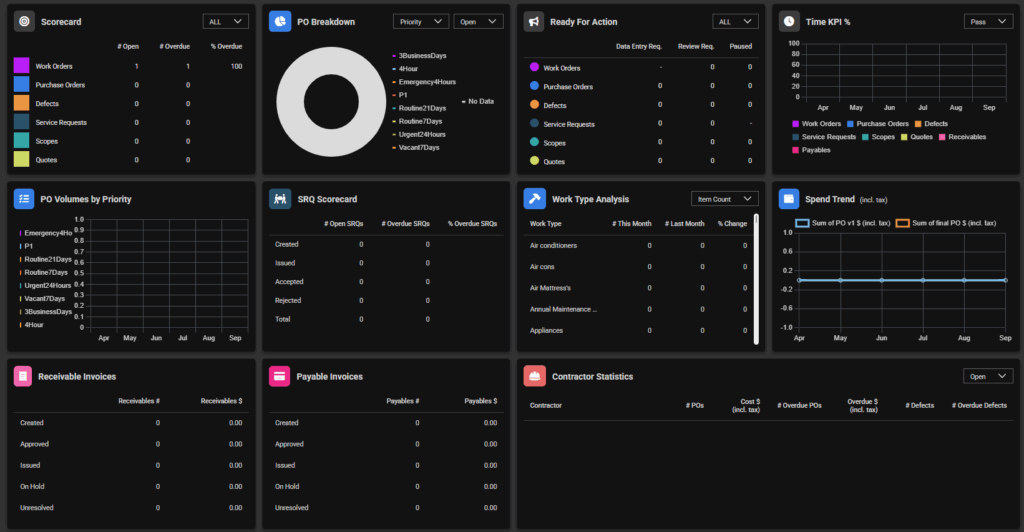
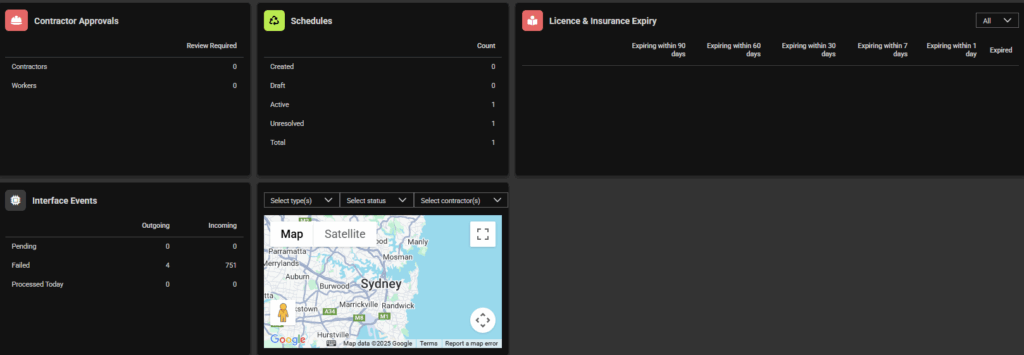
Widgets on the dashboard can be useful to view activity with ease on your SpyderFlow.
Your Dashboard and widgets are displayed as per your Role and Permission level. View with ease and click into workflow areas, invoices or admin errors through numerical links in the widgets.
Filter information displayed with handy dropdowns on selected widgets. Click and drag map for view movement of area.
Soon to come: Property and Assets Widgets with hover over ‘i’ for further explanation of widget
Some Available Widgets in SpyderFlow
Keep track of:
- Scorecard
- PO Breakdown
- Ready For Action
- Time KPI %
- PO Volumes by Priority
- SRQ Scorecard
- Work Type Analysis
- Receivable Invoices
- Payable Invoices
- Contractor Statistics
- Contractor Approvals
- Schedules
- Licence & Insurance Expiry
- Interface Events
- Maps
Note! Set how often the widgets refresh see link The Dashboard | Widgets Refresh Settings
User Role Permissions to see Dashboard Widgets
Subject to vary according to permissions set if customised by your organisation
- System Administrator – Full access including user and account management.
- Manager – Advanced review & approve functionality for standard workflows including invoicing.
- Finance – Advanced review & approve functionality for standard workflows including invoicing, financial settings and interface events.
- Read & Approve – Advanced review & approve functionality for standard workflows.
- Create & Update – Advanced review & approve functionality for standard workflows.
- Client Standard User – Basic create & update functionality for service requests.
- Contractor Administrator – Advanced access including user management for contractors.
- Contractor User – Basic access for contractor users.
- Field User – Ability to view asset, property, and item details, and view and update purchase orders and calendar entries.
- Asset & Calendar – Ability to view asset and property details, and view and update calendar entries.
- ReadOnly – Basic readonly access to standard workflows.
See link: The Dashboard | Appearance