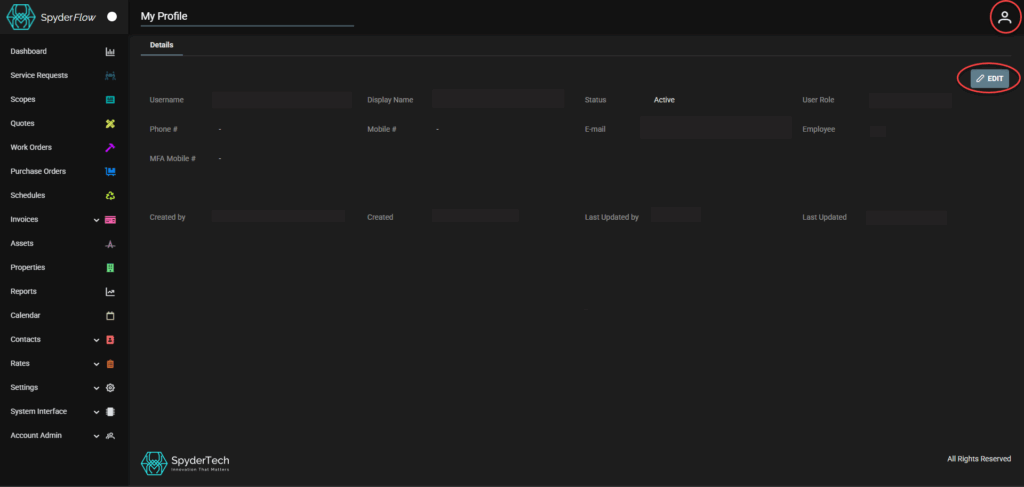
Located: Top Right click Profile Icon

Click Profile –> My Profile –> Details tab is default

Main “Sign in account” for your SpyderFlow.
My Profile – Details
Details Tab is default
- Username: Your username (that is currently signed in)
- Display Name: Your Display name (What you are known as)
- Status: Usually Active if you are able to sign into the SpyderFlow and access your profile.
- User Role: The User Role assigned to your access and permissions see User Account Administration | Role-Based Access Control (RBAC)
- Phone # Phone Number
- Mobile # Mobile Number
- Email: Sign in email address
- Employee: Associated Employee record
- MFA Mobile # The mobile phone MFA verify code can be sent to by call or text
- Created by: Email of who created your profile
- Created: Date/Time created
- Last updated by: User who last updated details in this area
- Last updated: Date/Ttme this area last updated
If any details are incorrect, click EDIT
- SAVE when complete.
NOTE! When in Edit view, only information in boxed fields can be changed and saved.
- Other fields are created by the system when subscription is created.