Records created in other SpyderFlow modules automatically appear in the Calendar as a Work Activity  .
.
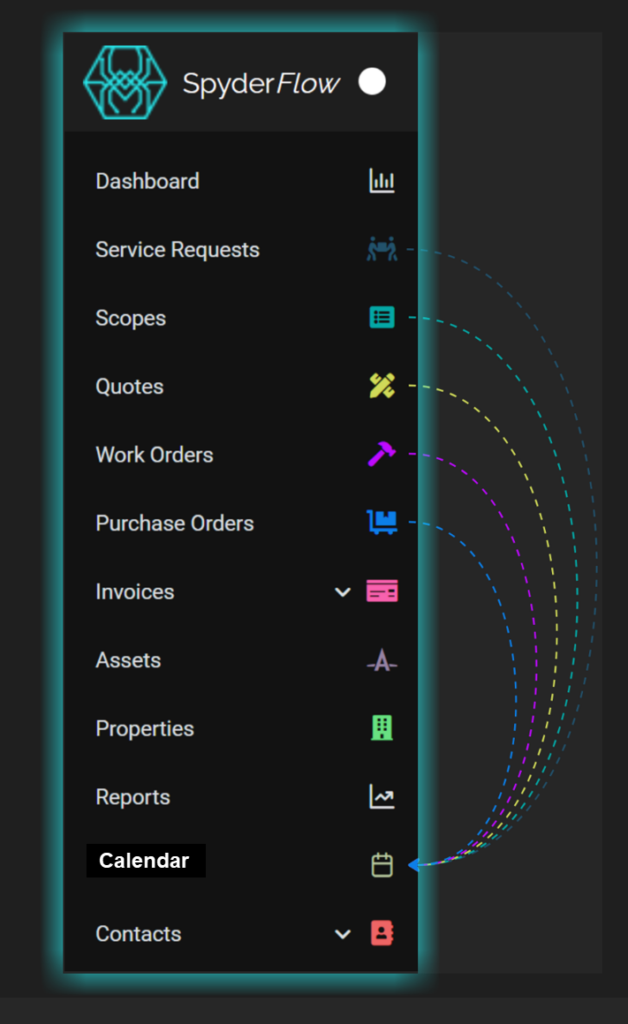
Visualising these in the Calendar helps users coordinate tasks, prevent conflicts, and oversee deadlines effectively.
 Good to know: Selecting a Work Activity in the Calendar opens the corresponding record, helping users to quickly access and update Work Activities directly.
Update Work Activity Dates with Drag & Drop
- Go to Main Menu > Calendar

- Update the dates of a Work Activity with any of the below options
- Select:
- YES to confirm
- YES & SEND CHANGES to confirm and send available updates
- NO to discard
Drag & Drop to a New Slot
This updates both Scheduled Start and Due dates simultaneously
Drag to Extend
This updates the Scheduled Start or Due date depending on which end of the Work Activity is extended
Good to know:
- Drag & Drop to a New Slot is disabled in the Month view and the all-day row in the Week view
- Drag to Extend is disabled for the time rows in the Week view
- After updating a Work Activity’s dates, selecting YES & SEND CHANGES is the equivalent of selecting SAVE & SEND directly on the record
- Because Drag to Extend extends only one date at a time, if both the Scheduled Start and Due Dates need to be updated the following is recommended:
- Update the first date (eg. Scheduled Start) and select YES
- Update the second date (eg. Due) and select YES & SEND CHANGES