SpyderTech SpyderTech
  • Home 
  • Solutions
    • SpyderFlow Sign in 
    • SpyderFlow 
    • Professional Services 
    • Industries 
    • NDIS 
    • Technology 
  • Support
    • Knowledge Base 
  • About 
  • Contact Us 

What can we help you with ?

Getting Started

12
  • Getting Started | SpyderFlow Overview
  • Getting Started | System Administrator | Subscriber Set Up
  • Getting Started | SpyderFlow Subscription
  • Getting Started | System Administrator | Plan User Access
  • Getting Started | Activate Invitation | First Time Microsoft SSO
  • Getting Started | Activate Invitation (Email Sign in)
  • Getting Started | Sign in (once activated) Options
  • Getting Started | Sign in by Email | Change Your Password
  • Getting Started | WEB | Main Menu and Dashboard
  • Getting Started | WEB | Set Fields for Workflow Dropdown Options
  • Getting Started | Field Groups
  • Getting Started | Understanding Fields and Field Options

SpyderFlow Mobile App Guide

23
  • Mobile App | About
  • Mobile App | Android | Install SpyderFlow
  • Mobile App | Apple (IOS) | Install SpyderFlow
  • Mobile App | Mobile Interface Refresh
  • Mobile App | Sign in Options
  • Mobile App | First Sign in | Choose Region
  • Mobile App | Home Screen
  • Mobile App | User Profile
  • Mobile App | Change Subscriber
  • Mobile App | Overall Search
  • Mobile App | Requests
  • Mobile App | Quote
  • Mobile App | Scope
  • Mobile App | Work Order
  • Mobile App | Purchase Order
  • Mobile App | Calendar
  • Mobile App | Property
  • Mobile App | Asset
  • Mobile App | Contractor
  • Mobile App | Client
  • Mobile App | Attachments
  • Mobile App | Codes | Scan
  • Mobile App | Codes | Generate

FAQs

7
  • FAQs | Invitation Issues and Resolutions
  • FAQs | Forgotten Username
  • FAQs | Forgot your Password
  • FAQs | Expired Invitation links
  • FAQs | Sensitive Information Protection
  • FAQs | Plan Markers | Assets and Properties
  • FAQs | The Link: Purchase and Work Orders

Troubleshooting Errors

2
  • Troubleshooting Errors | No-Reply SpyderFlow Email Update
  • Troubleshooting Errors | Authorisation | B2C Sign in Errors

The Dashboard

8
  • The Dashboard | WEB | Asset and Property Widgets
  • The Dashboard | WEB | Appearance
  • The Dashboard | WEB | Widgets
  • The Dashboard | WEB | Widgets Refresh Settings
  • The Dashboard | WEB | Payable Invoices Widget
  • The Dashboard | WEB | Map Widget
  • The Dashboard | WEB | Interface Events Widget
  • The Dashboard | WEB | Receivable Invoices

Service Requests

11
  • Service Requests | WEB | Flow Items
  • Service Requests | WEB | Overview
  • Service Request | WEB | Create New (Subscriber User)
  • Service Request | WEB | Create New (As a Client)
  • Service Requests | WEB | Requests
  • Service Requests | WEB | Details
  • Service Requests | WEB | Contacts
  • Service Requests | WEB | Related
  • Service Requests | WEB | Invoices
  • Service Requests | WEB | Notes
  • Service Request | WEB | Attachments

Scopes

6
  • Scopes | WEB | Overview
  • Scopes | WEB | Status
  • Scopes | WEB | List of Scopes
  • Scopes | WEB | Create New Scope 
  • Scopes | WEB | Add to Scheduler
  • Scopes | WEB | Flow to a Quote

Quotes

9
  • Quotes | Overview
  • Quotes | List of Quotes
  • Quotes | Create New Quote
  • Quotes | WEB | Add Items, Pricing, Contacts
  • Quotes | WEB | Related Tab
  • Quotes | WEB | Attachments and Activity Tabs
  • Quotes | WEB| Statuses
  • Quotes | Bulk Actions
  • Quotes | WEB | Invoices

Work Orders

11
  • Work Orders | WEB | Overview
  • Work Orders | WEB | Status
  • Work Orders | WEB | Create New Work Orders
  • Work Orders | WEB | Item of Work Process
  • Work Orders | WEB | Add Items
  • Work Orders | WEB | List of Work Orders
  • Work Orders | WEB | Variations
  • Work Orders | WEB | Attachable Forms
  • Work Orders | WEB | Flow from a Scope
  • Work Orders | WEB | Flow from a Quote
  • Work Orders | WEB | Flow to Invoices

Purchase Orders

8
  • Purchase Orders | WEB | Notes
  • Purchase Orders | Overview
  • Purchase Orders | WEB| Flow to Invoices
  • Purchase Orders | Inside a Purchase Order
  • Purchase Orders | Status
  • Purchase Orders | Locations
  • Purchase Orders | WEB | List of Purchase Orders
  • Purchase Orders | WEB | Work Order

Schedules

6
  • Schedules | WEB | An Overview
  • Schedules | WEB | Dashboard Widget
  • Schedules | WEB | Create New
  • Schedules | WEB | Add Recurrences and Links
  • Schedules | WEB | Bulk Actions
  • Schedules | WEB | Export

Invoices

9
  • Invoices | WEB | Receivables
  • Invoices | Overview and Subscriber User Roles
  • Invoices | Allow Manual Payments
  • Invoices | Send Invoices SpyderFlow
  • Invoices | Add Asset Name
  • Invoices | Edit Client Email
  • Invoices | Financial Settings
  • Invoices | Automate Invoice Creation Orders
  • Invoices | Payable | ‘Paid’ Option Greyed Out

Assets

15
  • Assets | WEB | Overview
  • Assets | WEB | List of Assets
  • Assets | WEB | Parenting Assets
  • Assets | WEB | Create New
  • Assets | WEB | Details
  • Assets | WEB | Codes
  • Assets | WEB | Location
  • Assets | WEB | Plans
  • Assets | WEB | Plan Markers
  • Assets | Codes | Assign and Scan
  • Assets | WEB | Print QR Codes
  • Assets| WEB | Contacts
  • Assets | WEB | Work History
  • Assets | WEB | Invoices
  • Assets | WEB | Notes

Properties

9
  • Properties | WEB | Overview
  • Properties | WEB | List of Properties
  • Properties | WEB | Create New
  • Properties | WEB | Details
  • Properties | WEB | Plans
  • Properties | WEB | Plan Markers
  • Properties | WEB | Contacts
  • Properties | WEB | Property Assets
  • Properties | WEB | Work History

Calendar

17
  • About The Calendar
  • Web | Calendar Features
  • Web | Filter
  • Web | Search
  • Web | Event Type Configuration
  • Web | Create an Event
  • Web | Edit an Event
  • Web | Delete an Event
  • Web | Work Activities
  • Web | Asset, Property, and Work Activity Calendars
  • Mobile | Calendar Features
  • Mobile | Filter
  • Mobile | Search
  • Mobile | Create an Event
  • Mobile | Edit an Event
  • Mobile | Delete an Event
  • Mobile | Work Activities

Contacts

1
  • Contacts | WEB | Overview

Clients

2
  • Clients | WEB | Overview
  • Clients | Accept Sign Up Invitation

Contractors

9
  • Contractors | WEB | Overview
  • Contractors | WEB | List of Contractors
  • Contractors | Settings | Create a New Contractor Record
  • Contractors | Subscriber | Add Contractor User
  • Contractor | WEB | Access and Work Flows
  • Contractors | WEB | Contractor Approvals Widget
  • Contractors | Approval Process | Contractors and Workers
  • Contractor | WEB | Contractor Workers Overview
  • Contractors | WEB | Create New Contractor Worker

Employees

7
  • Employees | WEB | User Roles Overview
  • Employees | Web | Information and RLS
  • Employees | WEB | List Of Employees
  • Employees | WEB | Create New User Roles
  • Employees | WEB | Create New Employee
  • Employees | WEB | Link to User Role
  • Employees | WEB | Multiple User Groups

Suppliers

1
  • Suppliers | WEB | Overview

Rates

6
  • Rates | WEB | Rate Groups and Availability
  • Rates | Rate Groups |+Create New
  • Rates | Rate Groups | Items – List of
  • Rates | Rate Groups | New Items and Linked Requests
  • Rates | Requests | List of Requests
  • Rates | Requests | +Create New

Settings

8
  • Settings | WEB | An Overview
  • Settings | WEB | Companies
  • Settings | WEB | Areas
  • Settings | WEB | Projects
  • Settings | WEB | Field Groups, Field Options
  • Settings | WEB | Field Options Overview
  • Settings | Fields | Create New
  • Settings | Fields | Bulk Actions

System Interface

5
  • System Interface | WEB | Incoming Events
  • System Interface | Outgoing Events
  • System Interface | Integration Modules
  • System Interface | Integration Modules | Create New
  • System Interface | Upload Integration Data

User Account Administration

19
  • User Account Administration | My Profile
  • User Account Administration | Role-Based Access Control (RBAC)
  • User Account Administration | Record-Level Security (RLS)
  • User Account Administration | User Roles and Permissions
  • User Account Administration | Main Subscription User
  • User Account Administration | Subscriber User Roles
  • Subscriber User Roles | Invite a New User
  • User Account Administration | Link User Role to Employee
  • User Account Administration | The System Administrator
  • Subscriber Role | Manager
  • Subscriber User | Finance Role
  • Subscriber User | Review and Approve Role
  • Subscriber User | Asset and Scheduler Role
  • Subscriber User | Create and Update Role
  • External Users | Invite to Your SpyderFlow System
  • External Users | Client Standard Role
  • Subscriber and External | Check User Status
  • Subscriber and External Roles | Edit User
  • Subscriber and External | Disable User Account

Profile Subscription Settings

2
  • Subscription Settings | User Access – Multiple subscriptions
  • Subscription Settings | Change Subscription

Subscriber Settings

8
  • Subscriber Settings | Overview and Details Tab
  • Subscriber Settings | Region Tab
  • Subscriber Settings | Workflow Tab
  • Subscriber Settings | Allow Generate QR Codes
  • Subscriber Settings | Communications Tab
  • Subscriber Settings | Financial Tab
  • Subscriber Settings | Security Tab
  • Subscriber Settings | Activity Tab

Customisation | Columns

4
  • Customisation | Columns | WEB | More Options
  • Customisation | Columns | Helpful Information
  • Customisation | Select List | Show or Hide Columns
  • Customisation | List Pages | Resize Columns

Custom Connection | Xero to SpyderFlow

14
  • Custom Connection | Xero | Overview
  • Custom Connection | Xero | Handy Hints
  • Custom Connection | Xero Settings
  • Custom Connection | Xero | Purchase Subscription
  • Custom Connection | Xero | Add a New App
  • Custom Connection | Xero | Select Accounting Scopes
  • Custom Connection | Xero | Send Authorisation Email
  • Custom Connection | Xero | Accept Email
  • Custom Connection | Xero | Client ID and Secret Key
  • Custom Connection | SpyderFlow | Financial settings
  • Custom Connection | Add Webhook URL to Xero
  • Custom Connection | Connected to Xero
  • Custom Connection | Map Tax Codes
  • Custom Connection | Xero to SpyderFlow | Tracking Categories

Multi-Factor Authentication MFA

9
  • Multi-factor Authentication | MFA | Overview
  • Multi-Factor Authentication MFA | WEB vs Mobile App
  • Multi-Factor Authentication MFA | First Time | Sign up by Email
  • Multi-Factor Authentication MFA | Verification code Options
  • Multi-Factor Authentication MFA | Verification Code to Phone
  • Multi-Factor Authentication MFA | Verification Code to Email
  • Multi-Factor Authentication MFA | Add MFA Phone Option to My Profile
  • Multi-Factor Authentication MFA | No MFA Phone Number added
  • Multi-Factor Authentication MFA | System Admin | Add MFA Phone Option to Users

Release Notes

19
  • RELEASE 2025-4
  • RELEASE 2025-3
  • RELEASE 2025-2
  • RELEASE 2025-1
  • RELEASE 2024-8
  • RELEASE 2024-7
  • RELEASE 2024-6
  • RELEASE 2024-5
  • RELEASE 2024-4
  • RELEASE 2024-3
  • RELEASE 2024-2
  • RELEASE 2024-1
  • RELEASE 2023-5
  • RELEASE 2023-4
  • RELEASE 2023-3
  • RELEASE 2023-2
  • RELEASE 2023-1
  • RELEASE 2022-2
  • RELEASE 2022-1

Reports

2
  • Reports | WEB | Assets and Properties
  • Reports | WEB | Overview

Account Admin

5
  • Account Admin | WEB | Employee | Assign to User Group
  • Account Admin | System Admin or Manager | Overview
  • Account Admin | WEB | User Groups | Security
  • Account Admin | WEB | System Admin | Set User Groups
  • Account Admin | WEB | System Admin | Enable RLS

Companies

6
  • Companies | WEB | Overview
  • Companies | WEB | List of Companies
  • Companies | WEB | +Create New
  • Companies | WEB | Financial tab
  • Companies | WEB | Related Tab
  • Companies | WEB | Activity Tab

SpyderFlow Manuals

3
  • SpyderFlow | How to Guide for Mobile App
  • Contractor Training Summary
  • Contractor Manual
  • Home
  • SpyderFlow Knowledge Base
  • Custom Connection | Xero to SpyderFlow
  • Custom Connection | Xero | Select Accounting Scopes
View Categories

Custom Connection | Xero | Select Accounting Scopes

After Create App is complete see link – Custom Connection | Xero | Add a New App

Next step –> Scope Authorisation window –> Select your Accounting Scopes

  • Your Xero Administrator – should have these details from financial records for organisation or be able to ask Company Accountant, Finance Manager.

1. Select Accounting Scopes

Scopes are required to the app to give authorisation to access information.

  • For more information see bottom of page. The Xero Developer site can give explanation of scopes and financial transactions.

Role Required: (Your Company – Xero Administrator)

  • Select from checkboxes in the Authorisation window for the correct accounting scopes.
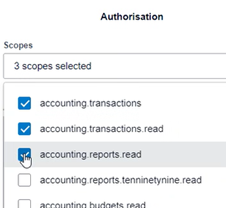


  • Example: In our organisation we chose 7 Accounting Scopes to suit our requirements for app access.
  • Once Scopes are chosen the next step is the Authorisation User.
    • Select Current User if this is your Authorised Xero User.
    • Or choose Different User and enter their email address.
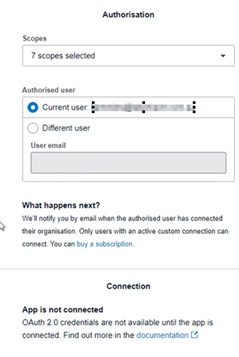


2. Authorised Email for Accounting Scopes

  • An email will be sent to the Authorised Xero User to connect.
  • Once accepted the connection is ready.


Further Assistance: 

Xero Developer. Scopes. Accessed June 2024. https://developer.xero.com/documentation/guides/oauth2/scopes/


Updated on 12 June 24
Table of Contents
  • 1. Select Accounting Scopes
  • 2. Authorised Email for Accounting Scopes
  • Further Assistance: 

Archives

No archives to show.

Categories

  • No categories

SpyderTech © 2025 · GDPR and Privacy Policy