Main Menu
Main Menu view shows section headings and icons. The level of permissions will show what you can access on this menu.
- System Administrator will get full menu access.
- Internal users (employees) will see the menu in accordance of their permission level (this varies).
- An External user (contractor or others) will be limited/restricted menu to the permission level also.
Example:
- Full Access – SpyderFlow Administrator Main Menu and Dashboard
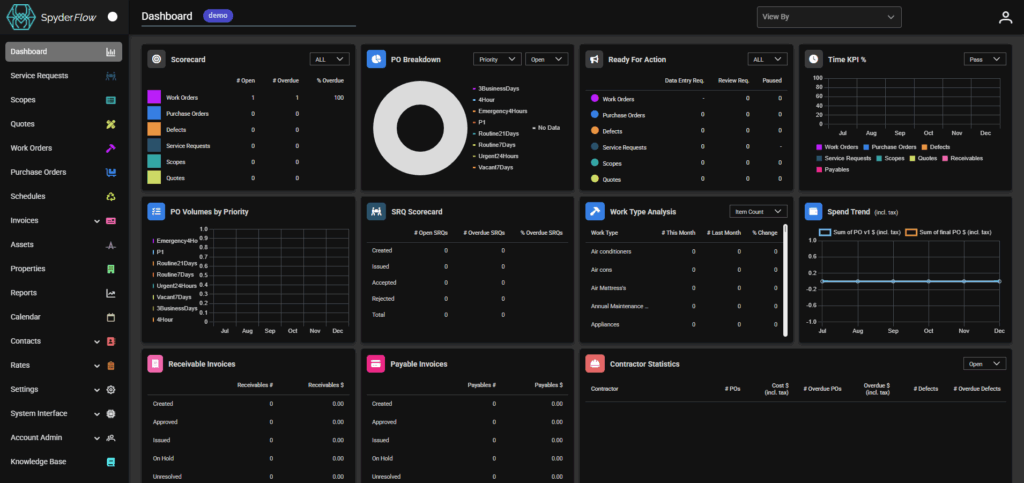
Main Menu is colour matched to sections in SpyderFlow for ease of use and uniformity with the workflow management system.
-
- Dashboard
- Service Requests
- Scopes
- Quotes
- Work Orders
- Purchase Orders
- Schedules
- Invoices
- Assets
- Properties
- Reports
- Calendar
- Contacts
- Rates
- Settings
- System Interface
- Account Admin
- Knowledge Base added to the Main Menu.
The Dashboard is a collection of widgets to view activity and keep track of workflows, approval requirements, issues, requests and more.
Some current widgets include:
- Scorecard
- PO Breakdown
- Ready for Action
- Time KPI%
- PO Volumes by Priority
- SRQ Scorecard
- Work Type Analysis
- Spend Trend (incl Tax)
- Receivable Invoices
- Payable Invoices
- Contractor Statistics
- Licence and Insurance Expiry
- Schedules
- Interface Events
- Maps
and more in the planning ……