Recommended for Subscriber Users – Review & Approve Role: Can view, create, edit, review, and approve Scopes.
For full access – Subscriber Manager Role has access to all areas at administrator level.
List of Scopes
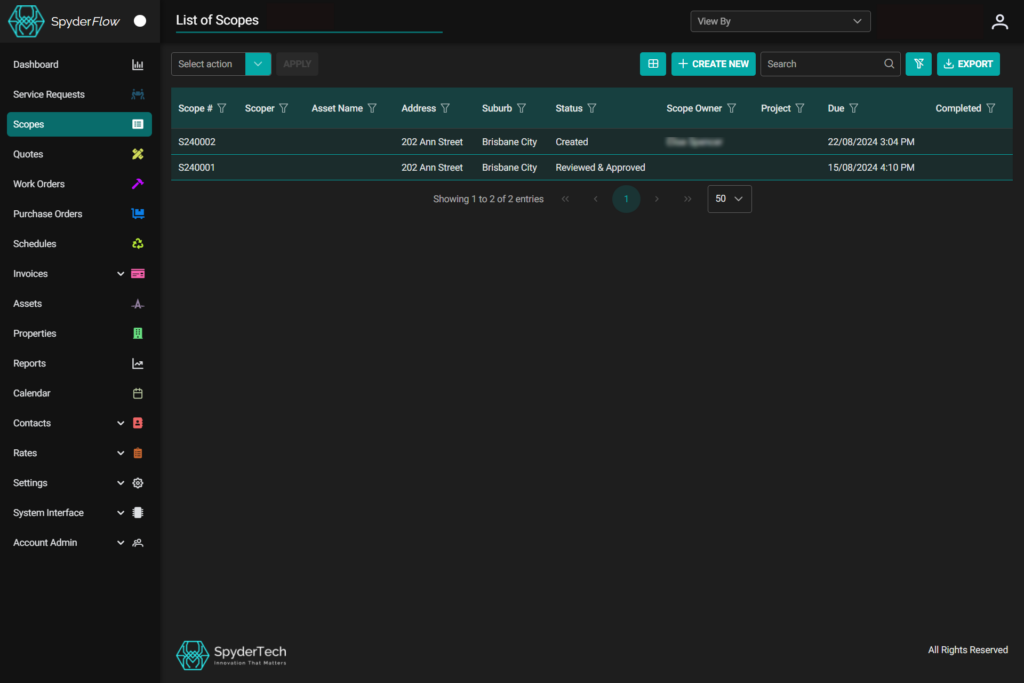
When opening Scopes the default landing page is List of Scopes.
Select Action –> Choose bulk actions to apply to selected or all scopes
List of Scopes page —> Page Header top left
Top right is View By: Choose to view by Companies or Clients set up inside your SpyderFlow system.
Under View by: Sort List Columns, +Create New, Search, Clear filters and Export.
Headings across top each can be Sorted or Filtered.
- Sort can be ascending or descending
- Filter can be Match All, Match Any, Starts with, Contains etc.
- Rules can also be added to filters and removed when no longer needed.
Export: Select the entries to be exported through pop out window checkboxes, to be exported to Spreadsheet data.
Next –> Scopes | WEB | Create New Scope