SpyderTech SpyderTech
  • Home 
  • Solutions
    • SpyderFlow Sign in 
    • SpyderFlow 
    • Professional Services 
    • Industries 
    • NDIS and Aged Care 
    • Technology 
  • Support
    • Knowledge Base 
  • About 
  • Contact Us 

What can we help you with ?

Getting Started

15
  • Getting Started | SpyderFlow Sign Up Options
  • Getting Started | User Profile | Reset Log In
  • Getting Started | SpyderFlow Overview
  • Getting Started | System Administrator | Subscriber Set Up
  • Getting Started | SpyderFlow Subscription
  • Getting Started | System Administrator | Plan User Access
  • Getting Started | Activate Invitation | First Time Microsoft SSO
  • Getting Started | Activate Invitation (Email Sign in)
  • Getting Started | Sign in (once activated) Options
  • Getting Started | Sign in by Email | Change Your Password
  • Getting Started | WEB | Main Menu and Dashboard
  • Getting Started | WEB | Fields
  • Getting Started | WEB | Set Fields for Workflow Dropdown Options
  • Getting Started | Field Groups
  • Getting Started | Understanding Fields and Field Options

SpyderFlow Mobile App Guide

24
  • Mobile App | About
  • Mobile App | Android | Install SpyderFlow
  • Mobile App | Apple (IOS) | Install SpyderFlow
  • Mobile App | Mobile Interface Refresh
  • Mobile App | Sign in Options
  • Mobile App | First Sign in | Choose Region
  • Mobile App | Home Screen
  • Mobile App | User Profile
  • Mobile App | Change Subscriber
  • Mobile App | Overall Search
  • Mobile App | Camera | Watermark on Photos
  • Mobile App | Requests
  • Mobile App | Quote
  • Mobile App | Scope
  • Mobile App | Work Order
  • Mobile App | Purchase Order
  • Mobile App | Calendar
  • Mobile App | Property
  • Mobile App | Asset
  • Mobile App | Contractor
  • Mobile App | Client
  • Mobile App | Attachments
  • Mobile App | Codes | Scan
  • Mobile App | Codes | Generate

FAQs

8
  • FAQs | No-Reply SpyderFlow Email Update
  • FAQs | Invitation Issues and Resolutions
  • FAQs | Forgotten Username
  • FAQs | Forgot your Password
  • FAQs | Expired Invitation links
  • FAQs | Sensitive Information Protection
  • FAQs | Plan Markers | Assets and Properties
  • FAQs | The Link: Purchase and Work Orders

Sign in issues

2
  • Sign In Issues | Clear Cache, Cookies, Browser history
  • Sign In Issues | Cannot sign into SpyderFlow | B2C Errors

The Dashboard

10
  • The Dashboard | WEB | Edit Layout
  • The Dashboard | WEB | View By
  • The Dashboard | WEB | Asset and Property Widgets
  • The Dashboard | WEB | Appearance
  • The Dashboard | WEB | Widgets
  • The Dashboard | WEB | Widgets Refresh Settings
  • The Dashboard | WEB | Payable Invoices Widget
  • The Dashboard | WEB | Map Widget
  • The Dashboard | WEB | Interface Events Widget
  • The Dashboard | WEB | Receivable Invoices

Service Requests

11
  • Service Requests | WEB | Flow Items
  • Service Requests | WEB | Overview
  • Service Request | WEB | Create New (Subscriber User)
  • Service Request | WEB | Create New (As a Client)
  • Service Requests | WEB | Requests
  • Service Requests | WEB | Details
  • Service Requests | WEB | Contacts
  • Service Requests | WEB | Related
  • Service Requests | WEB | Invoices
  • Service Requests | WEB | Notes
  • Service Request | WEB | Attachments

Scopes

6
  • Scopes | WEB | Overview
  • Scopes | WEB | Status
  • Scopes | WEB | List of Scopes
  • Scopes | WEB | Create New Scope 
  • Scopes | WEB | Add to Scheduler
  • Scopes | WEB | Flow to a Quote

Quotes

9
  • Quotes | Overview
  • Quotes | List of Quotes
  • Quotes | Create New Quote
  • Quotes | WEB | Add Items, Pricing, Contacts
  • Quotes | WEB | Related Tab
  • Quotes | WEB | Attachments and Activity Tabs
  • Quotes | WEB| Statuses
  • Quotes | Bulk Actions
  • Quotes | WEB | Invoices

Work Orders

13
  • Work Orders | WEB | Notes
  • Work Orders | WEB | Overview
  • Work Orders | WEB | Status
  • Work Orders | WEB | Create New Work Orders
  • Work Orders | WEB | Item of Work Process
  • Work Orders | WEB | Add Items
  • Work Orders | WEB | List of Work Orders
  • Work Orders | WEB | Variations
  • Work Orders | WEB | Flow from a Scope
  • Work Orders | WEB | Flow from a Quote
  • Work Orders | WEB | Flow to Invoices
  • Work Orders | WEB | Attachable Forms
  • Work Orders | Attachments | Sign Off

Purchase Orders

8
  • Purchase Orders | Overview
  • Purchase Orders | WEB| Flow to Invoices
  • Purchase Orders | Inside a Purchase Order
  • Purchase Orders | Status
  • Purchase Orders | Locations
  • Purchase Orders | WEB | List of Purchase Orders
  • Purchase Orders | WEB | Work Order
  • Purchase Orders | WEB | Notes

Schedules

6
  • Schedules | WEB | An Overview
  • Schedules | WEB | Dashboard Widget
  • Schedules | WEB | Create New
  • Schedules | WEB | Add Recurrences and Links
  • Schedules | WEB | Bulk Actions
  • Schedules | WEB | Export

Invoices

9
  • Invoices | Overview and Subscriber User Roles
  • Invoices | Allow Manual Payments
  • Invoices | Send Invoices SpyderFlow
  • Invoices | Add Asset Name
  • Invoices | Edit Client Email
  • Invoices | Financial Settings
  • Invoices | Automate Invoice Creation Orders
  • Invoices | Payable | ‘Paid’ Option Greyed Out
  • Invoices | WEB | Receivables

Assets

15
  • Assets | WEB | Overview
  • Assets | WEB | List of Assets
  • Assets | WEB | Parenting Assets
  • Assets | WEB | Create New
  • Assets | WEB | Details
  • Assets | WEB | Codes
  • Assets | WEB | Location
  • Assets | WEB | Plans
  • Assets | WEB | Plan Markers
  • Assets | Codes | Assign and Scan
  • Assets | WEB | Print QR Codes
  • Assets| WEB | Contacts
  • Assets | WEB | Work History
  • Assets | WEB | Invoices
  • Assets | WEB | Notes

Properties

9
  • Properties | WEB | Overview
  • Properties | WEB | List of Properties
  • Properties | WEB | Create New
  • Properties | WEB | Details
  • Properties | WEB | Plans
  • Properties | WEB | Plan Markers
  • Properties | WEB | Contacts
  • Properties | WEB | Property Assets
  • Properties | WEB | Work History

Calendar

17
  • About The Calendar
  • Web | Calendar Features
  • Web | Filter
  • Web | Search
  • Web | Event Type Configuration
  • Web | Create an Event
  • Web | Edit an Event
  • Web | Delete an Event
  • Web | Work Activities
  • Web | Asset, Property, and Work Activity Calendars
  • Mobile | Calendar Features
  • Mobile | Filter
  • Mobile | Search
  • Mobile | Create an Event
  • Mobile | Edit an Event
  • Mobile | Delete an Event
  • Mobile | Work Activities

Contacts

1
  • Contacts | WEB | Overview

Clients

2
  • Clients | WEB | Overview
  • Clients | Accept Sign Up Invitation

Contractors

11
  • Contractors | Contractor View | Purchase Orders
  • Contractors | Subscriber View | Definition and Setup
  • Contractors | Subscriber view | List of Contractors
  • Contractors | Subscriber View | Create a New Contractor
  • Contractors | Subscriber | Add Contractor User
  • Contractor | WEB | Access and Work Flows
  • Contractors | WEB | Contractor Approvals Widget
  • Contractors | Approval Process | Contractors and Workers
  • Contractor | WEB | Contractor Workers Overview
  • Contractors | Subscriber WEB | Create New Contractor Worker
  • Contractors | Contractor Administrator | Invite other Users

Employees

7
  • Employees | WEB | User Roles Overview
  • Employees | Web | Information and RLS
  • Employees | WEB | List Of Employees
  • Employees | WEB | Create New User Roles
  • Employees | WEB | Create New Employee
  • Employees | WEB | Link to User Role
  • Employees | WEB | Multiple User Groups

Suppliers

1
  • Suppliers | WEB | Overview

Rates

6
  • Rates | WEB | Rate Groups and Availability
  • Rates | Rate Groups |+Create New
  • Rates | Rate Groups | Items – List of
  • Rates | Rate Groups | New Items and Linked Requests
  • Rates | Requests | List of Requests
  • Rates | Requests | +Create New

Settings

8
  • Settings | WEB | An Overview
  • Settings | WEB | Companies
  • Settings | WEB | Areas
  • Settings | WEB | Projects
  • Settings | WEB | Field Groups, Field Options
  • Settings | WEB | Field Options Overview
  • Settings | Fields | Create New
  • Settings | Fields | Bulk Actions

System Interface

5
  • System Interface | WEB | Incoming Events
  • System Interface | Outgoing Events
  • System Interface | Integration Modules
  • System Interface | Integration Modules | Create New
  • System Interface | Upload Integration Data

User Account Administration

19
  • User Account Administration | My Profile
  • User Account Administration | Role-Based Access Control (RBAC)
  • User Account Administration | Record-Level Security (RLS)
  • User Account Administration | User Roles and Permissions
  • User Account Administration | Main Subscription User
  • User Account Administration | Subscriber User Roles
  • Subscriber User Roles | Invite a New User
  • User Account Administration | Link User Role to Employee
  • User Account Administration | The System Administrator
  • Subscriber Role | Manager
  • Subscriber User | Finance Role
  • Subscriber User | Review and Approve Role
  • Subscriber User | Asset and Scheduler Role
  • Subscriber User | Create and Update Role
  • External Users | Invite to Your SpyderFlow System
  • External Users | Client Standard Role
  • Subscriber and External | Check User Status
  • Subscriber and External Roles | Edit User
  • Subscriber and External | Disable User Account

Profile Subscription Settings

2
  • Subscription Settings | User Access – Multiple subscriptions
  • Subscription Settings | Change Subscription

Subscriber Settings

8
  • Subscriber Settings | Overview and Details Tab
  • Subscriber Settings | Region Tab
  • Subscriber Settings | Workflow Tab
  • Subscriber Settings | Allow Generate QR Codes
  • Subscriber Settings | Communications Tab
  • Subscriber Settings | Financial Tab
  • Subscriber Settings | Security Tab
  • Subscriber Settings | Activity Tab

Customisation | Columns

4
  • Customisation | Columns | WEB | More Options
  • Customisation | Columns | Helpful Information
  • Customisation | Select List | Show or Hide Columns
  • Customisation | List Pages | Resize Columns

Custom Connection | Xero to SpyderFlow

14
  • Custom Connection | Xero | Overview
  • Custom Connection | Xero | Handy Hints
  • Custom Connection | Xero Settings
  • Custom Connection | Xero | Purchase Subscription
  • Custom Connection | Xero | Add a New App
  • Custom Connection | Xero | Select Accounting Scopes
  • Custom Connection | Xero | Send Authorisation Email
  • Custom Connection | Xero | Accept Email
  • Custom Connection | Xero | Client ID and Secret Key
  • Custom Connection | SpyderFlow | Financial settings
  • Custom Connection | Add Webhook URL to Xero
  • Custom Connection | Connected to Xero
  • Custom Connection | Map Tax Codes
  • Custom Connection | Xero to SpyderFlow | Tracking Categories

Multi-Factor Authentication MFA

9
  • Multi-factor Authentication | MFA | Overview
  • Multi-Factor Authentication MFA | WEB vs Mobile App
  • Multi-Factor Authentication MFA | First Time | Sign up by Email
  • Multi-Factor Authentication MFA | Verification code Options
  • Multi-Factor Authentication MFA | Verification Code to Phone
  • Multi-Factor Authentication MFA | Verification Code to Email
  • Multi-Factor Authentication MFA | Add MFA Phone Option to My Profile
  • Multi-Factor Authentication MFA | No MFA Phone Number added
  • Multi-Factor Authentication MFA | System Admin | Add MFA Phone Option to Users

Release Notes

23
  • RELEASE 2026-4 – COMING SOON!
  • RELEASE 2026-3
  • RELEASE 2026-2
  • RELEASE 2026-1
  • RELEASE 2025-4
  • RELEASE 2025-3
  • RELEASE 2025-2
  • RELEASE 2025-1
  • RELEASE 2024-8
  • RELEASE 2024-7
  • RELEASE 2024-6
  • RELEASE 2024-5
  • RELEASE 2024-4
  • RELEASE 2024-3
  • RELEASE 2024-2
  • RELEASE 2024-1
  • RELEASE 2023-5
  • RELEASE 2023-4
  • RELEASE 2023-3
  • RELEASE 2023-2
  • RELEASE 2023-1
  • RELEASE 2022-2
  • RELEASE 2022-1

Reports

2
  • Reports | WEB | Overview
  • Reports | WEB | Assets and Properties

Account Admin

5
  • Account Admin | System Admin or Manager | Overview
  • Account Admin | WEB | User Groups | Security
  • Account Admin | WEB | System Admin | Set User Groups
  • Account Admin | WEB | System Admin | Enable RLS
  • Account Admin | WEB | Employee | Assign to User Group

Companies

6
  • Companies | WEB | Overview
  • Companies | WEB | List of Companies
  • Companies | WEB | +Create New
  • Companies | WEB | Financial tab
  • Companies | WEB | Related Tab
  • Companies | WEB | Activity Tab

SpyderFlow Manuals

5
  • Contractors | Invite your Workers as Users in SpyderFlow
  • SpyderFlow Manuals | Watermark on Photos
  • SpyderFlow | How to Guide for Mobile App
  • SpyderFlow | Contractor Training Summary
  • SpyderFlow | Contractor Manual

Data Exports

1
  • Data Exports | WEB | Overview

Themes

1
  • Themes | WEB | Light and Dark

Flags

1
  • Flags | WEB | Overview

Notes

2
  • Notes | WEB | Overview
  • Notes | Note Alerts | WEB and Mobile
  • Home
  • SpyderFlow Knowledge Base
  • Release Notes
  • RELEASE 2026-4 – COMING SOON!
View Categories

RELEASE 2026-4 – COMING SOON!

Pre-release preview: The changes below are planned for the August 2026 release and are not yet available in production.

  August 2026


New Features


✦ Threads

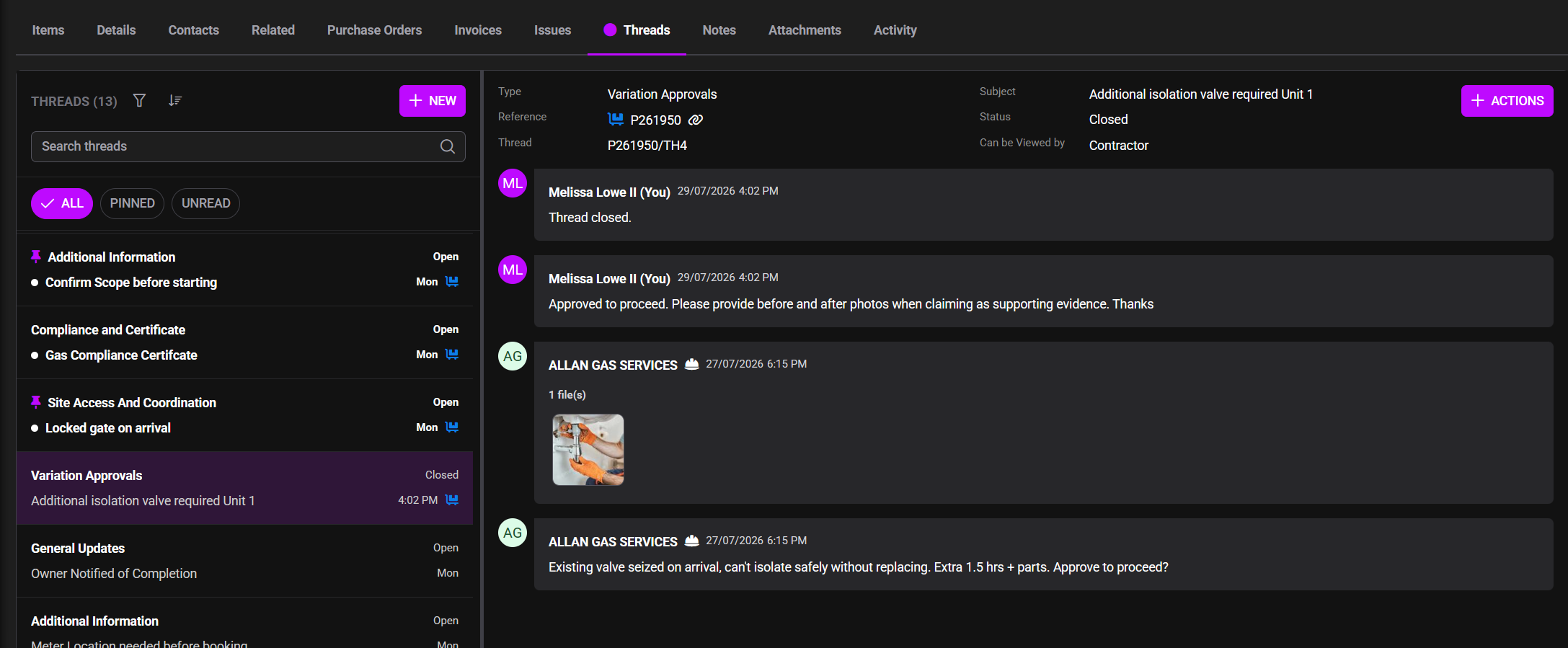
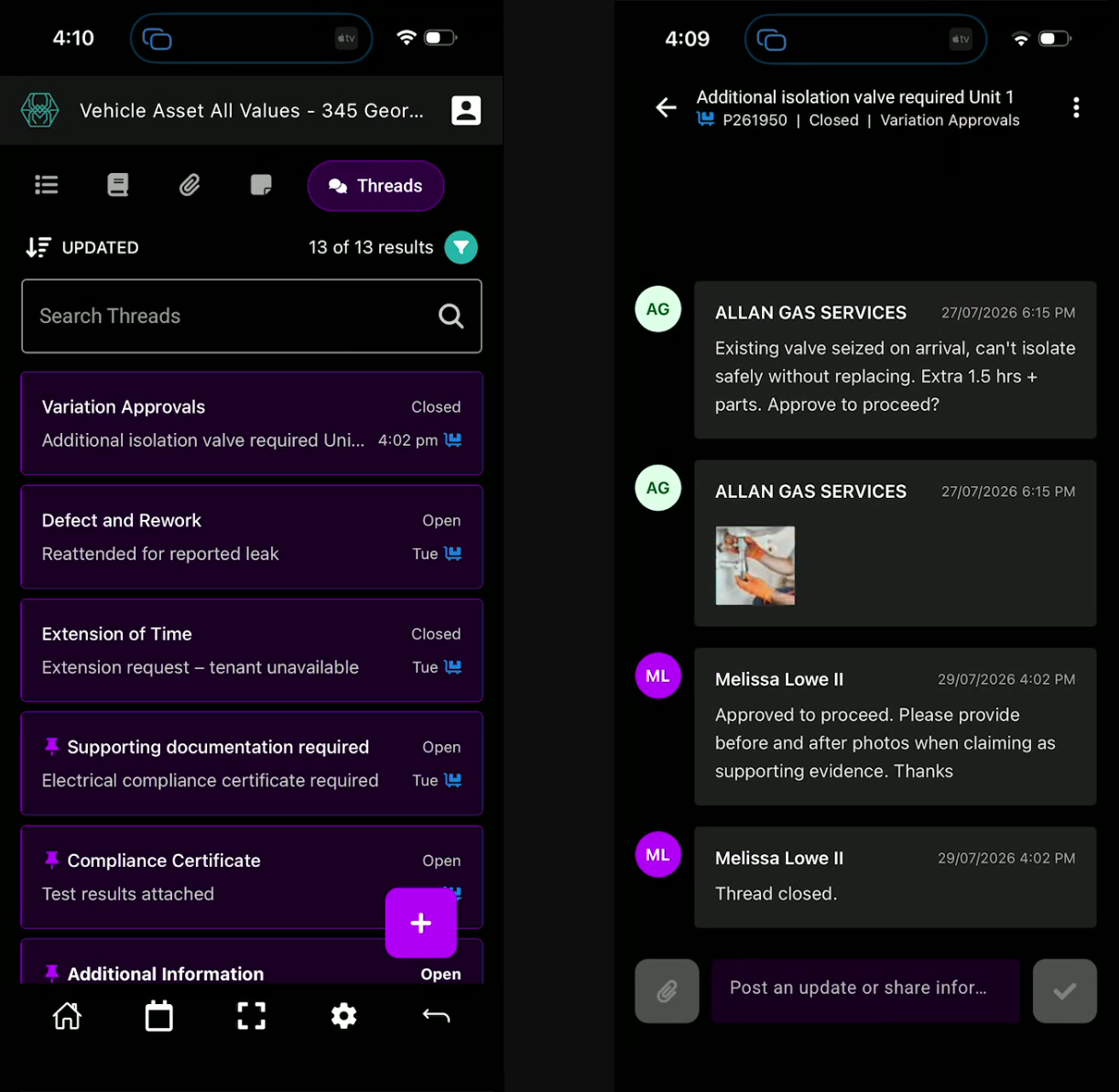
Threads provides a central place for subscribers to hold and track conversations about work with their clients and contractors. By keeping communication connected to the relevant record and highlighting new or important activity, Threads makes it easier to see what has changed, follow up where needed and know when a conversation is complete.

Further information will be available in the Knowledge Base soon.


Threads on web
Threads on mobile

✦ New Work Order Statuses

The work order and purchase order workflow has been extended to provide clearer visibility after approval:

  • Reviewed & Approved has been renamed Approved
  • A new Invoiced status indicates that all invoiceable items on the order have been included on an approved invoice.
  • A new Closed status indicates that all invoiceable items have been paid, or that the order has no invoiceable items remaining.

Existing work orders and purchase orders will be assessed and automatically updated to the appropriate status as part of the release.


✦ Update Assets & Properties in Bulk

Administrators can now use the Incoming Events import tool to update existing asset and property records in bulk, in addition to creating new records. This makes it easier to maintain large volumes of asset and property information efficiently.


✦ Announcement Banner

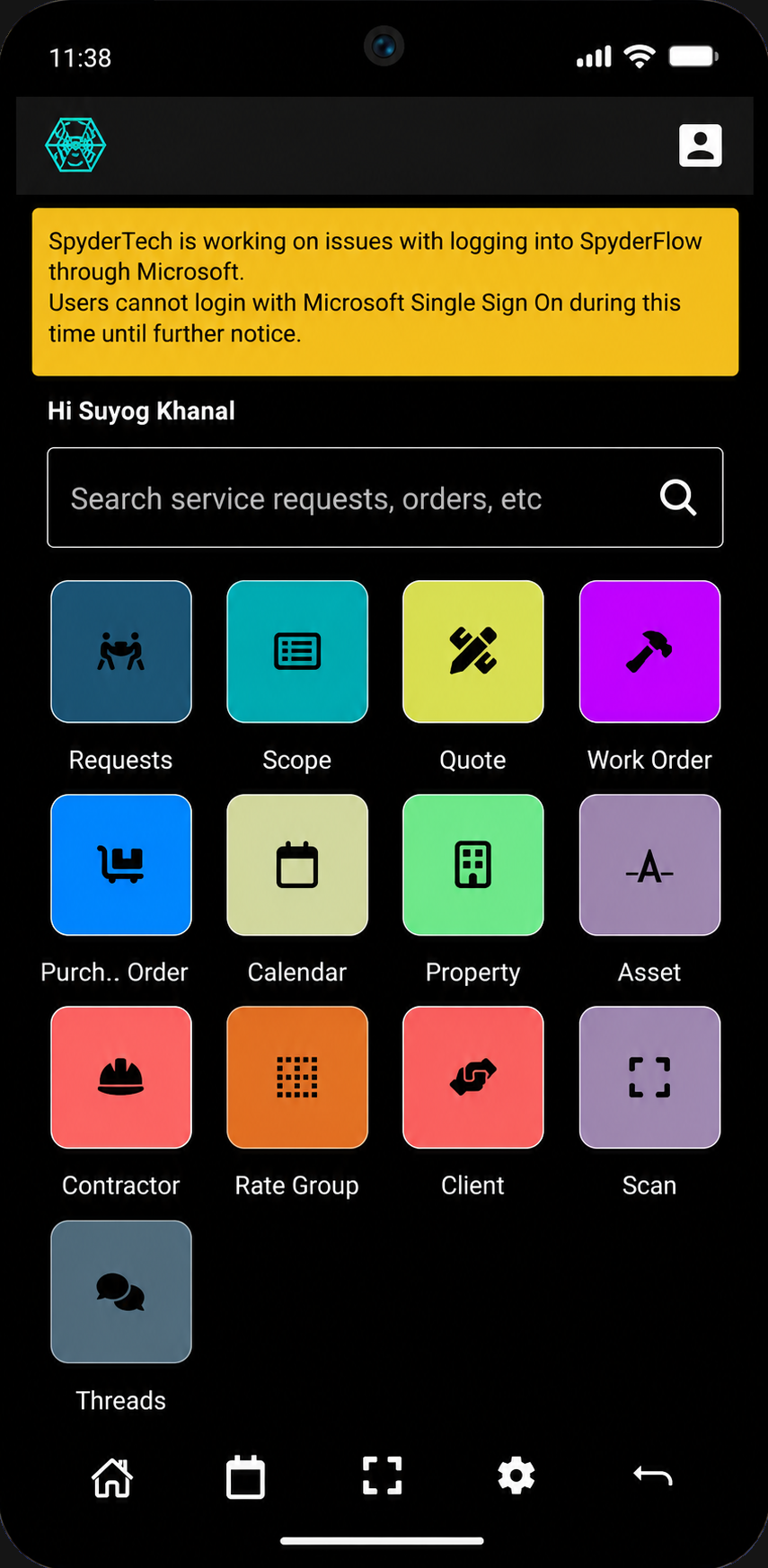
A new System Announcement Banner has been introduced to provide important updates directly within SpyderFlow. The banner will be used to notify users of scheduled maintenance, known system issues and other critical announcements, helping users stay informed without relying solely on external communications.
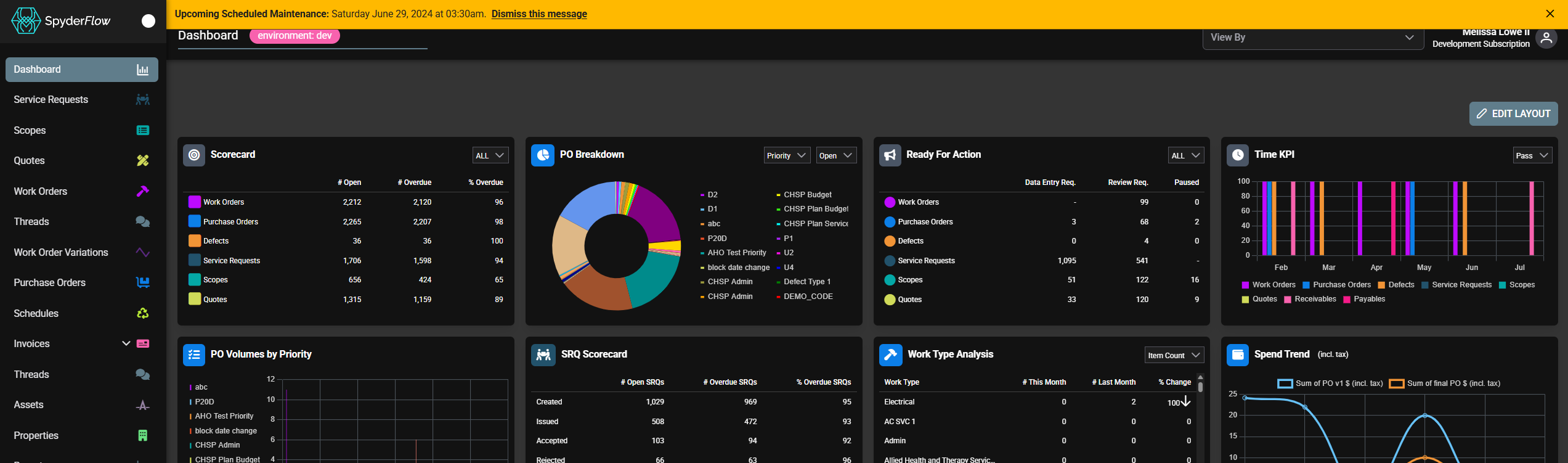
Announcement Banner in web
Announcement Banner in mobile


Improvements

Global

  • SMS notifications are now delivered through Twilio, while retaining the existing SMS functionality across SpyderFlow.
  • The Date Resolved is now automatically recorded when an issue is resolved.
  • Reference and record-type indicators now use the appropriate record-type icon instead of the previous dot indicator.
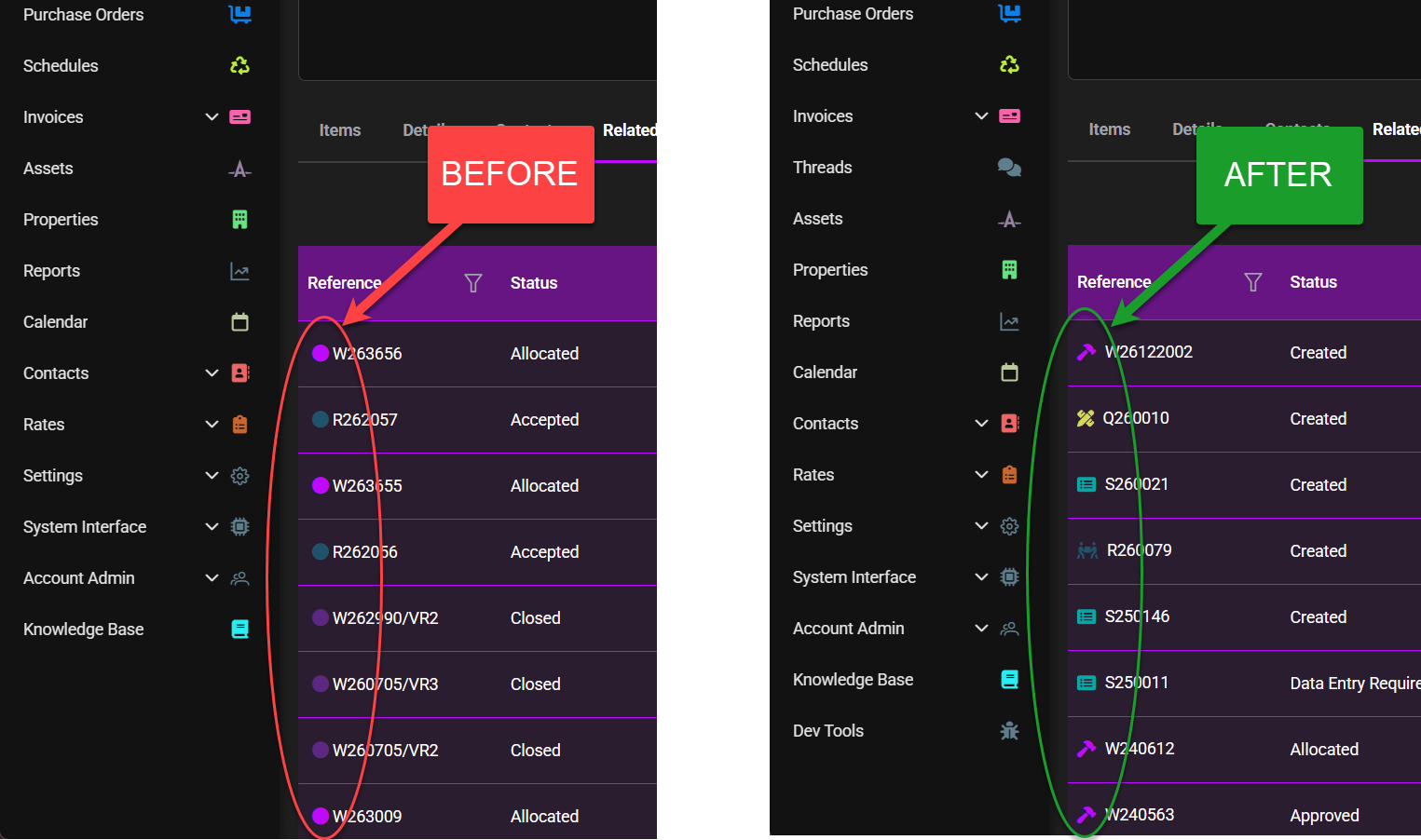
Coloured dot indicators updated to show relevant icon

Web

  • Invoices can no longer be approved from the invoice list unless the associated work order has reached Reviewed & Approved status.
  • Invoice visibility and available actions now more accurately respect client, financial entity and contractor access permissions.
  • Client and Business Entity fields have been removed from integration module configuration, simplifying the integration setup.
  • Links have been added to make it easier to navigate directly to relevant client, contractor and external-user profiles.
  • Notes for a purchase order can now be created directly from the work order’s Notes list by selecting the applicable purchase order.
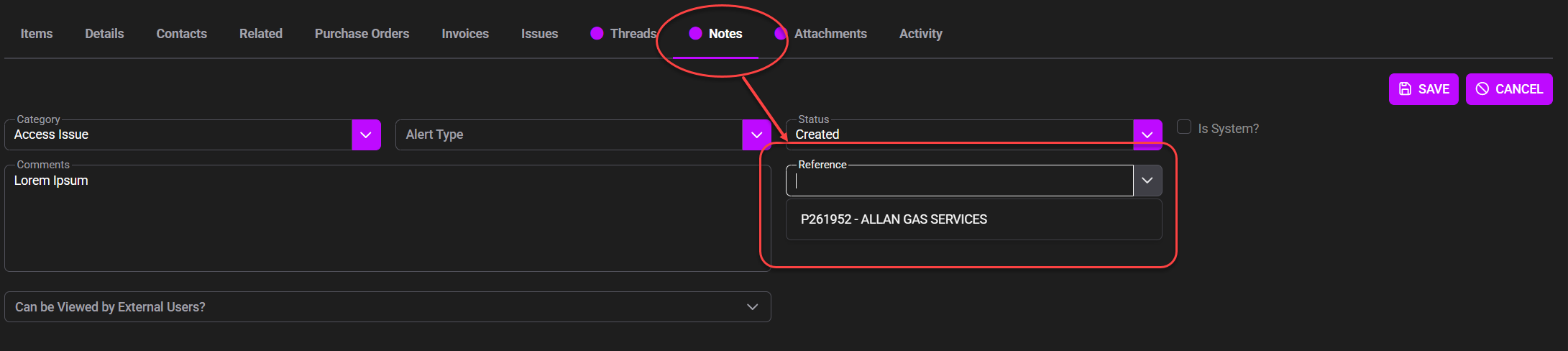
Link a Work Order Note to a Purchase Order
  • Attachments for a purchase order can now be added directly from the work order’s Attachments list by selecting the applicable purchase order.
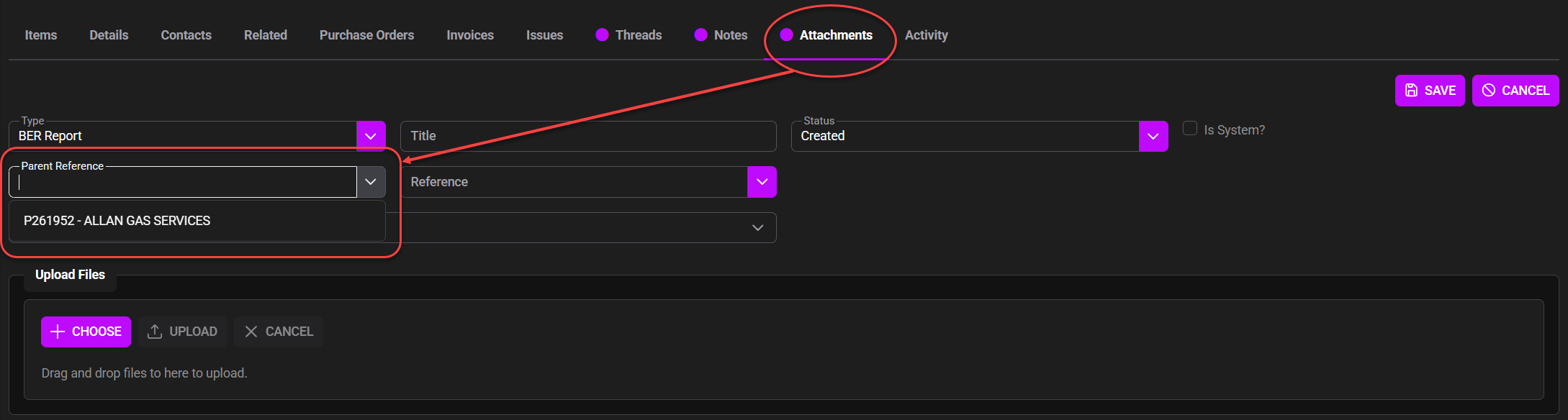
Link a Work Order Attachment to a Purchase Order
  • A clearer prompt is now displayed when selected attachment files are still pending and the Upload action must be completed.
  • Contact is now available as an optional column in the Contractors list.

Mobile

  • The Android application has been updated to support Google’s latest target API requirements.
  • SpyderFlow Mobile has been updated to version 2026.4.0.

API/Other

  • SOR and Order Schedule imports now correctly validate configured field groups.
  • Support functions have been added to allow SOR prices to be updated in bulk.
  • Invoice support functions now provide additional options for interfaced invoices, including adding payments and reverting an invoice from Paid to Issued.
  • API action endpoints have been updated to use JSON request bodies where supported

Bug Fixes

  • 14 bugs resolved


Support

For help and support email [email protected]

Updated on 29 July 26
Table of Contents
  • New Features
    • ✦ Threads
    • ✦ New Work Order Statuses
    • ✦ Update Assets & Properties in Bulk
    • ✦ Announcement Banner
  • Improvements
  • Bug Fixes
  • Support

Archives

No archives to show.

Categories

  • No categories

SpyderTech © 2026 · GDPR and Privacy Policy