Support flexible data capture through attachable forms
Description: This feature allows SpyderFlow users to attach multiple forms to a single business object record, enabling richer and more flexible data capture.
- Form questions are defined by the Customer, with initial setup and availability in the system provided by SpyderTech as a service.
By supporting varied use cases, workflows, and compliance requirements, this capability ensures that records can be tailored to the unique operational and regulatory needs of each Subscriber.
Located: Main Menu –> List of Work Orders –> Select a Work Order –> Attachments Tab –> Click +ADD

- Choose Type (Type of form to add to Work Order)
- Fill in field details according to type chosen e.g.
- Title
- Status
- Reference
- Can be viewed by External Users?
- Upload Files
Click to Save when complete
Add more forms through the +ADD as required
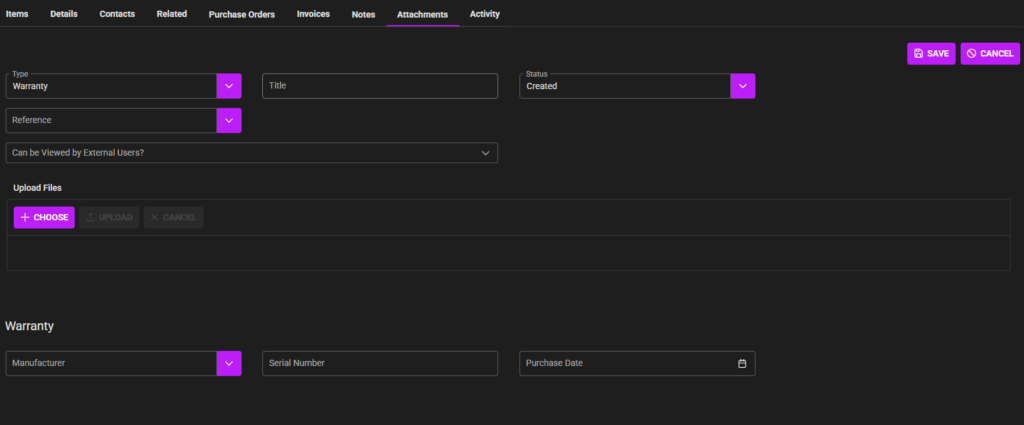
Example 1: Warranty form
-
- Manufacturer
- Serial Number
- Purchase Date
Example 2: 1 year, Serial
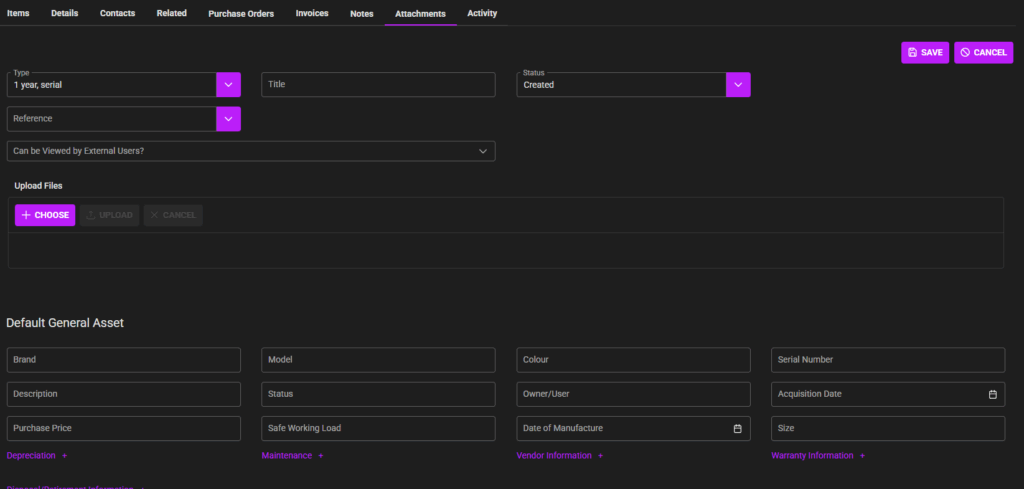
Adds Asset fields
- Default General Asset fields
- Depreciation
- Maintenance
- Vendor Information
- Warranty information
- Disposal/Retirement information