Located: Main Menu –> Assets –> List of Assets Landing Page
- Asset may have a parent (which could be property or asset), or it could be standalone.
- Assets must have an Asset name.
- List of Assets can be sorted and filtered by column headings.
- Search Assets and/or Export List of Assets to Spreadsheets.
List of Assets | Select Action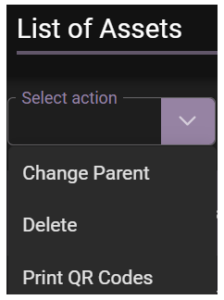
Choose bulk actions to update selected (multiple) records:
- Change Parent
- Delete
- Print QR Code
Search, Sort, Filter and Export Assets

+ Create New
- Create a New Asset details page opens see link – Asset | Create New Asset
List of Assets | Search
- Search by keywords, full or partial numerical or alphabetical format.
List of Assets | Sort and Filter
- Assets can be sorted in list ascending or descending order.
- Filtering field 1: can be “Match All” or Match Any”.
- Filtering field 2: can be “Starts With, Contains, Not Contains, Ends With, Equal and Not Equals”.
List of Assets | Export
- Click ‘Export’ from List of Assets Landing Page
- Select entries to be exported
- Click Export
- Assets will be exported into Spreadsheets to your default downloads.