✦ Global Search on Web
Global Search is now available on web, in line with mobile. Use the search bar in the Side Bar Menu to find work orders, purchase orders and other items across SpyderFlow without navigating through different menus.
Search results open the standard page for the selected item. Using the browser back button or Back to list returns you to your search results with your query retained.
The Global Search sits at the top of the Main Menu in Dashboard view so you can search all areas, this is an overall search of SpyderFlow.
Consolidates the search for every ‘List of pages’ which can be useful to do say a search of all workflow to an address.
- Previously a search would have been needed to be done at each workflow/contacts ‘List of’ pages (Assets, Purchase Orders, Suppliers, Contractors, Invoices and more) for example.
- Now a Global Search opens the results into a List of Global Search Results Page with these workflow associations consolidated to view.
How does this work?
Go to Main Menu and type in the Global Search an address, keywords etc
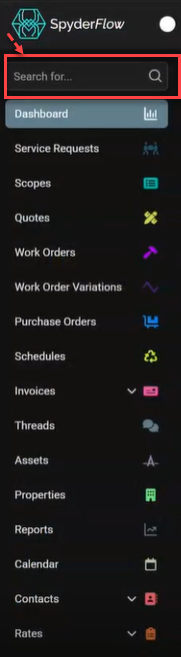
- Results will open in List of Global Search results page. The search keywords will then move from the search box at top of main menu to the Global Search list page as same as other list page format.
- Available on Global Search List page: Column data can be filtered, Column customisation is available, Global Search results move to List page, remove filtering and Export are also available
- Listed results can include: Assets, Properties, Scopes, Quotes, Purchase Orders, Work Orders, Invoices, Contractors, Suppliers for example. Workflow and Contacts type areas.
- Not included in Search Results: Rates, Settings, Account Admin and System Interface. Configuration or Setting type areas
Global Search Results
Subscriber view example: Depending on user permissions a global search can show a combined view of workflows with properties, assets, linked orders, invoices, contacts etc.
External users example: Contractors can search and see a combined view of jobs linked to a property search.
Note: Not available to Client and Customer user access at this time. Cancelled work orders are shown on the Web version of Global Search but not available on mobile.